+971502982989

+971502982989
| Supply voltage | 12 V DC |
| Operating temperature range | -10°C…+55°C |
| Standby mode current consumption | 500 mA |
| Max. current consumption | 620 mA |
| Weight | 430 g |
| Maximum humidity | 93±3% |
| Environmental class according to EN50130-5 | II |
| Supported memory cards | microSD, micro SDHC |
| Enclosure dimensions (width x height x thickness) | 196 x 129 x 22 mm |
The possibilities offered by the advanced, modern alarm systems based on the INTEGRA control panels require convenient control methods. The INT-TSI keypad introduces a new quality to the operation of such alarm systems.
Thanks to a large 7” touchscreen it offers comfort of use previously reserved only for smartphones and tablets. As you can use the interactive screen widgets, you can control with one tap the lighting, heating, raising and lowering of roller shutters or blinds or even watering of plants. The INT-TSI means also instant access to information about the system status which may be presented on the screen in a graphic form.
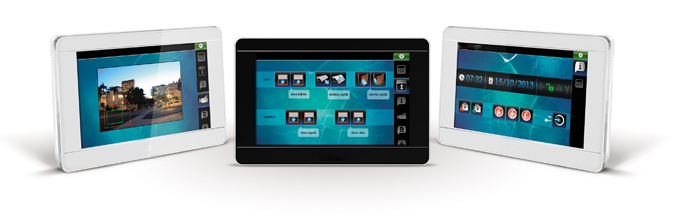
The INT-TSI hides advanced technology inside. Its efficient processor guarantees smooth operation of the extended graphic interface. Advanced software and high quality equipment make it possible to configure the system combining security and home automation. Pioneer solutions applied in the INT-TSI keypad offer the installer unlimited possibilities to create user’s interface so that everyday system control is intuitive, nice and easy.
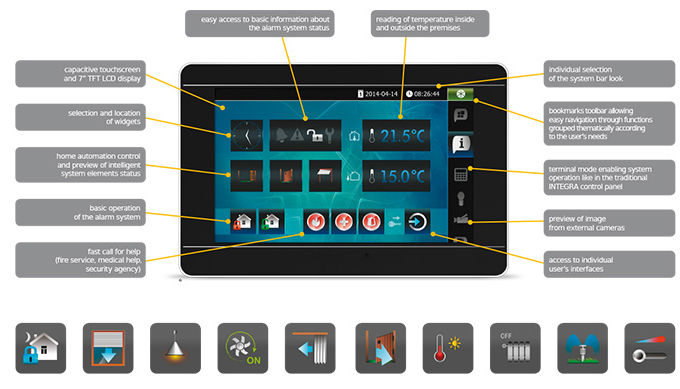
The main idea for development of the INT-TSI was to guarantee convenient daily operation of an intelligent alarm system. Natural choice was the graphical user interface known from mobile devices such as smartphones and tablets. This solution enables the available system functions to be presented with colorful, attractive widgets – elements guaranteeing interaction between the user and the system.
The INT-TSI widgets may, for example, serve as control keys for the security system and automation, and status indicators of individual elements of the entire system, as well as combine these functions within one key. Additionally, the clock, date, temperature and other widgets may be displayed. Individual icons may be assigned to particular functions, thus enabling intuitive use of the system.
The INT-TSI interface is continually enhanced to offer a number of useful features which make daily operation of the system and use of the keypad itself easy, convenient and effective. One of such features is the weather widget to which forecast is downloaded from the openweathermap.org website. Scalability of the size of the buttons has also been introduced, thus enabling the interface to be even better customized for the needs of keypad users. The option to present the system state in screensaver mode has been added as well.
In order to make the use of keypad easier, individual widgets may be placed on multiple screens which you can easily switch between using the tab bar. In this way the widgets can be grouped by their functionality which makes it easier to find functions needed at a given time. When it is necessary to authorize an operation with the user code, the icons will be replaced by a window with numeric keyboard to enter the password.
The basic screen may be arranged, for example, so that the system user can have quick access to the keys responsible for arming and disarming the alarm system, log-in to additional functions, and can quickly “call for help”. The latter feature will allow you, if necessary, to get the required assistance with just a tap on the icon indicating the type of threat.
The feature that makes the INT-TSI an ideal choice for the intelligent home automation system is the possibility to execute sequences of actions with each widget. This allows you to run the scenarios – complex sequences of actions called by one touch. For example, the “movie” command may lower the roller blinds, unfold the projection screen and dim lighting in the living room.
Scenarios may also include control of heating, air-conditioning, curtains, entry and garage gates, as well as garden sprinkling.
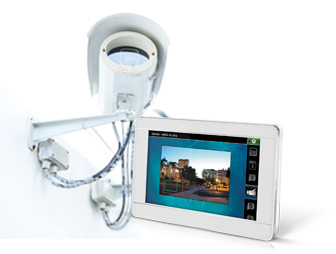
unctionality of the new INT-TSI keypad means not only control of the alarm system and automation devices.
Thanks to the possibility to display image from digital cameras of video monitoring, the new keypad becomes a real security center, where the critical security functions are concentrated.
This makes it possible e.g. to display on its screen the image from camera installed by the gate or to check who is moving around in your back garden.
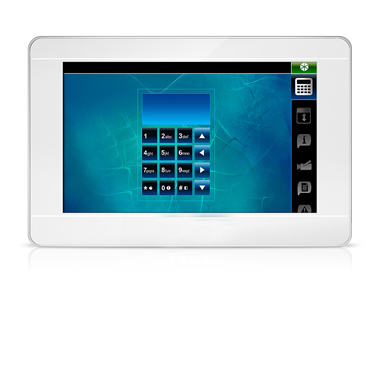
The terminal mode simulates operation of the traditional keypad of INTEGRA control panels. Such a solution may be convenient for people accustomed to the traditional operation of the system. In order to guarantee safety, the system randomly chooses the place of keyboard display each time when the terminal appears on the screen. This makes guessing (cracking) the password more difficult.
The keypad wallpaper may be freely selected to suit the user’s taste and imagination. Ready-to-use graphics, a family photo etc. may serve as the background, or else plain background may be used. This modern keypad, alluding to the contemporary design trends, is available in two color versions. Thus it can visually “blend in” with the interior, constituting a modern part of it, which is a treat for every enthusiast of technology.
An interesting and unique feature of the INT-TSI is the ability to customize its interface individually for every user – both in terms of functionality and appearance. For example, the users of solely basic functions will only have access to those most essential for them, while the more advanced users may benefit from the extended version of the interface.
However, this is not the end to the capabilities of INT-TSI customization to individual preferences. The configuration tool allows you to use one of the four refined sets of graphic elements, or so-called interface skins, which can give an attractive and unique appearance to your device.
You can also let free rain to your imagination and create your own look of the user interface.
All the above options available in the INT-TSI can be simply and conveniently programmed via the dedicated Configurator of the TSI Builder user interface. It allows the Installer to quickly and easily configure even the most advanced alarm system with elements of home automation. This program ensures optimal use of a wide range of functionality offered by the INT-TSI. As a result, the alarm system will be ideally suited to the needs and expectations of all its users, meeting their individual needs.
The Drag&Drop technology used in the TSI Builder makes it extremely easy to configure the alarm system being built - to add new elements to it, just drag them from the palette of available widgets. The end result of the TSI Builder work is a set of configuration files saved to the SD card which is inserted by the Installer into the INT-TSI keypad. Moreover, you can save configuration of the user interface to the keypad directly from the TSI Builder program via Ethernet.
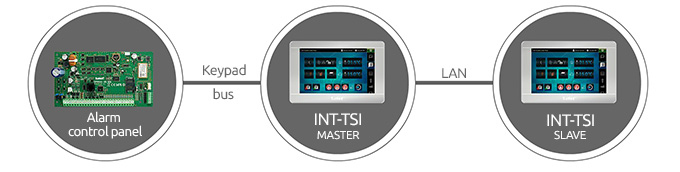
The INT-TSI keypad also offers the MASTER / SLAVE operating mode. With this option, there can be one extra keypad to each keypad connected to the bus, so their number in the system can be doubled in an easy and fast way. The keypad working in the SLAVE mode will communicate with the control panel via the keypad connected to the bus, working in the MASTER mode. Communication between them will take place via the Ethernet network. An important point is that the user interface in keypad operating in SLAVE mode can be configured entirely independently of the user interface in keypad operating in MASTER mode.
The actual appearance of the products may differ from the presented images. Product descriptions are provided in the web service for information purposes only.